Healthcare

Inpatient Discharge & Community Handover

Coordinate discharge planning, care and equipment dependencies, clinical approval and receiving-provider acknowledgement.

13 workspace menus · 5 role profiles · Connected records

Designed for hospital patient flow directors
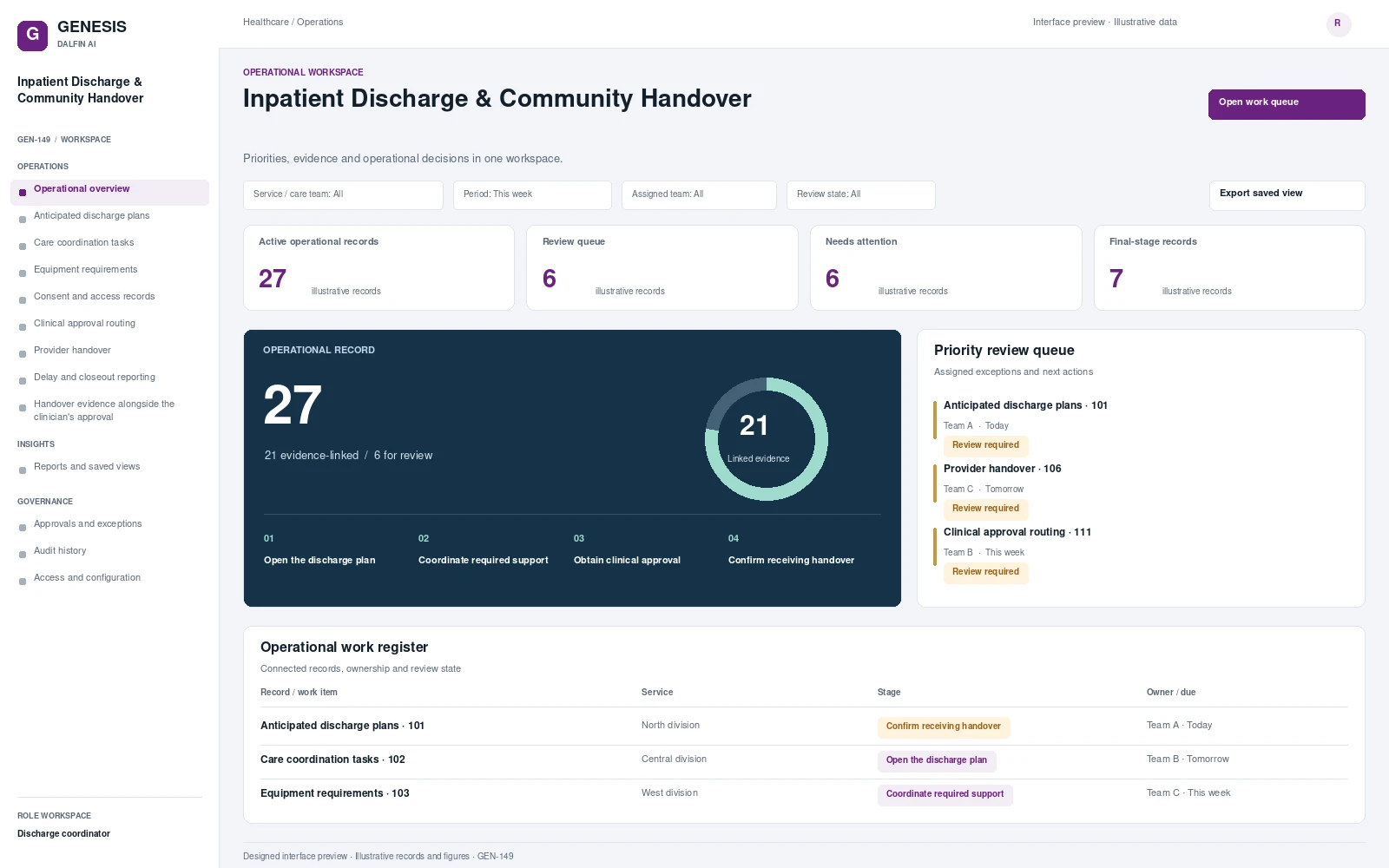
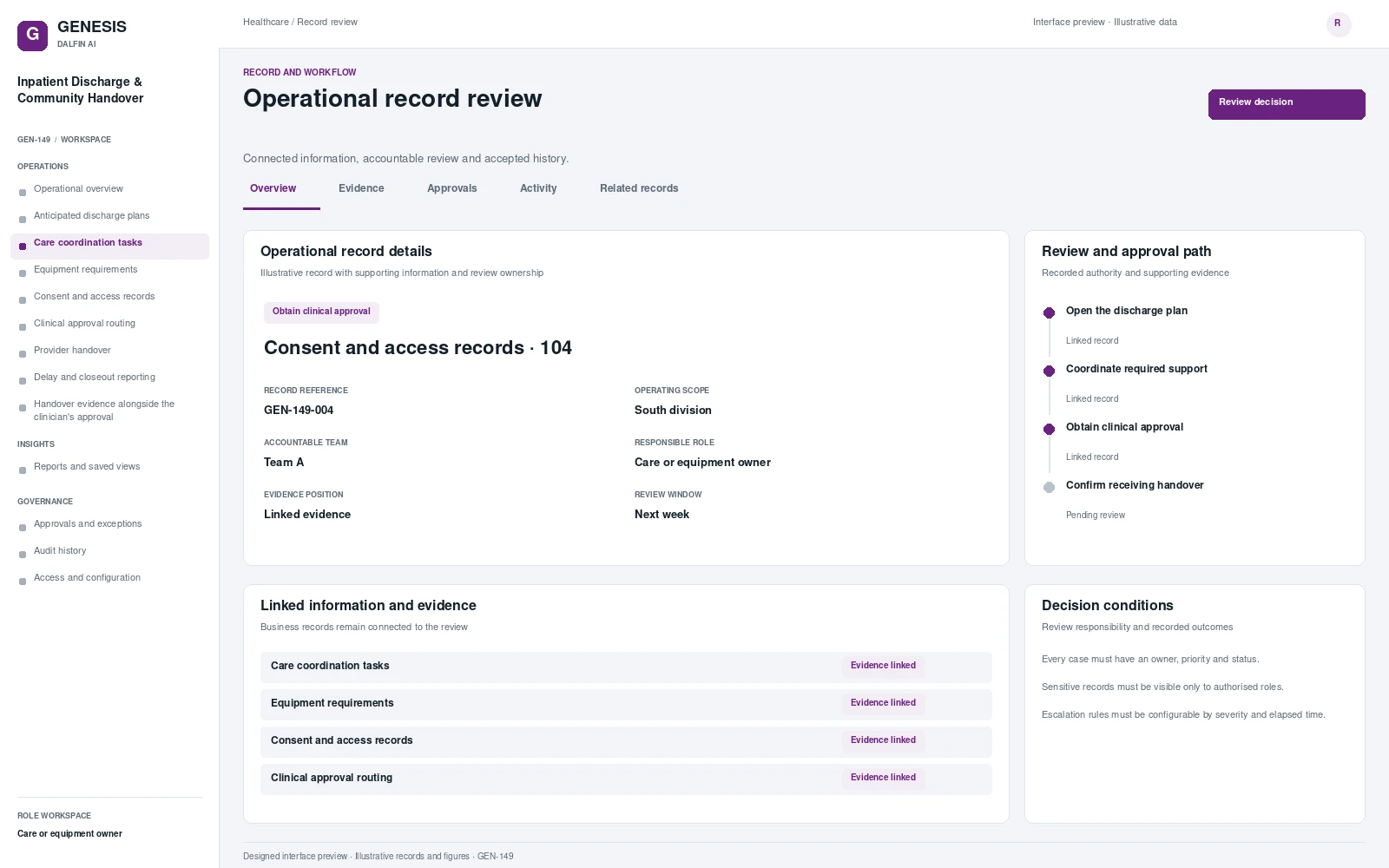
Inpatient Discharge & Community Handover workspace interface preview; illustrative records and figures.
Inpatient Discharge & Community Handover — operational workspaceInterface preview · Illustrative dataView full interface →

Explore the system interface.

Operational workspace and record review. Select a screen to inspect it in full.
Operational dashboards and work queues.

Operational views

Review work, evidence, exceptions and authorised decisions within a defined operating scope.

Service / care teamPeriodAssigned teamReview state

Dashboard measures

  • Active operational records
    Count of all records in the selected workspace.
  • Review queue
    Records at the third stage of the business workflow.
  • Needs attention
    Records with an assigned review requirement.
  • Final-stage records
    Records in the fourth business workflow stage.

Business workflow and operating scope

Coordinate discharge planning, care and equipment dependencies, clinical approval and receiving-provider acknowledgement. A discharge plan can be delayed by unresolved transport, equipment or receiving-service tasks even after the clinical team is ready to review it. This administrative scope makes those dependencies accountable and records the handover evidence alongside the clinician's approval.

Operational visibility

  • Discharge delays from unresolved coordination tasks
  • Open cases by priority and ageing
  • Service level / cycle time dashboard
  • Escalation and exception report
  • Resolution outcomes and rework

Operations

Operational overview

Review the work position and priority actions.

Anticipated discharge plans

Coordinate anticipated discharge plans with assigned responsibilities, linked records and review history.

Care coordination tasks

Coordinate care coordination tasks with assigned responsibilities, linked records and review history.

Equipment requirements

Coordinate equipment requirements with assigned responsibilities, linked records and review history.

Consent and access records

Coordinate consent and access records with assigned responsibilities, linked records and review history.

Clinical approval routing

Coordinate clinical approval routing with assigned responsibilities, linked records and review history.

Provider handover

Coordinate provider handover with assigned responsibilities, linked records and review history.

Delay and closeout reporting

Coordinate delay and closeout reporting with assigned responsibilities, linked records and review history.

Handover evidence alongside the clinician's approval

Coordinate handover evidence alongside the clinician's approval with assigned responsibilities, linked records and review history.

Insights

Reports and saved views

Review the reporting scope and export agreed operational views.

Governance

Approvals and exceptions

Review delegated decisions, exceptions and recorded conditions.

Audit history

Trace accepted changes, decisions and accountable actions.

Access and configuration

Manage the agreed role permissions and configurable operating rules.

The end-to-end business journey.

From intake to authorised completion, with evidence at each decision.

01

Open the discharge plan

Open anticipated discharge plan.

02

Coordinate required support

Coordinate care and equipment needs.

03

Obtain clinical approval

Obtain clinical discharge approval.

04

Confirm receiving handover

Confirm receiving provider handover.

Governance and control

  • Every case must have an owner, priority and status.
  • Sensitive records must be visible only to authorised roles.
  • Escalation rules must be configurable by severity and elapsed time.
  • Decisions that affect entitlement, safety or payment require accountable human approval.
  • Closed cases may reopen only through a controlled path that preserves history.
  • Jurisdiction-, regulator- or authority-specific rules must be configurable and validated by an authorised domain owner before production use.

Accountable roles

Discharge coordinator
Authorised clinician
Care or equipment owner
Receiving provider
Patient flow reviewer

Permissions are configured and tested for the agreed responsibilities.

Data, interfaces and operating requirements.

Core records

Case / requestPerson / customerService / issue typeTaskAssignmentDecisionEvidence / communicationResolution

Systems and interfaces

  • Approved clinical records
  • Equipment and care coordination systems
  • Secure provider communications

Interface scope, data mapping and testing are agreed for each engagement.

Implementation requirements
Requires clinical record access, patient consent controls and secure communication with approved community service providers.

Mobile and tablet access

Provide authorised teams with coordination status and permitted handover acknowledgements. Clinical decisions remain clinician controlled.

Access approved workflows through the Dalfin mobile app. Device tasks and permissions are confirmed for the deployment.

AI extensions

Draft administrative handover summaries for authorised staff under agreed privacy controls.

AI extensions are scoped around the required data, business outcome and review controls.

Engineered with Genesis.

Structured application engineering

Connect requirements, roles, records, workflows and interfaces through the agreed Genesis engineering process.

Controlled changes

Review dependency impact and validation requirements. Context Memory supports governed changes and accepted application revisions.

Deployment and support

Agree customer cloud or on-premises requirements, device access, implementation acceptance and ongoing engineering support.

An example operating scenario

See the process, its exception and the evidence.

A discharge plan waits for equipment confirmation. The coordinator resolves the dependency, the clinician records the discharge decision and the approved receiving provider acknowledges the handover. The record preserves consent and outstanding administrative actions.

What to review

  • A saved end-to-end transaction
  • An exception and its authorised resolution
  • Different operator, approver and reviewer permissions
  • Final records, history and the relevant report

Questions before implementation.

How is this system adapted to our organisation?

Roles, approval authority, business rules, records and reporting are configured around your operating model. Scope definition connects the required business outcome to workflows, interfaces and acceptance criteria.

How are approvals and responsibilities defined?

Operators, reviewers and authorised decision makers have defined responsibilities. Approval limits, exception handling and access permissions are agreed with your business owners and tested against the selected workflows.

Can it connect with our existing systems?

Interface requirements cover your existing business systems, data ownership, mapping and authentication. Connection design and testing form part of the agreed implementation scope.

What will we review in a solution walkthrough?

Start with a relevant business transaction, then review its approvals, an exception, role permissions and final records. Discuss the integrations, reporting and operating requirements that matter to your organisation.